




Why Do My Solar Apps Show Different Numbers? (Enphase vs Battery)

Solar monitoring apps don't match? Here's why and how to fix it.
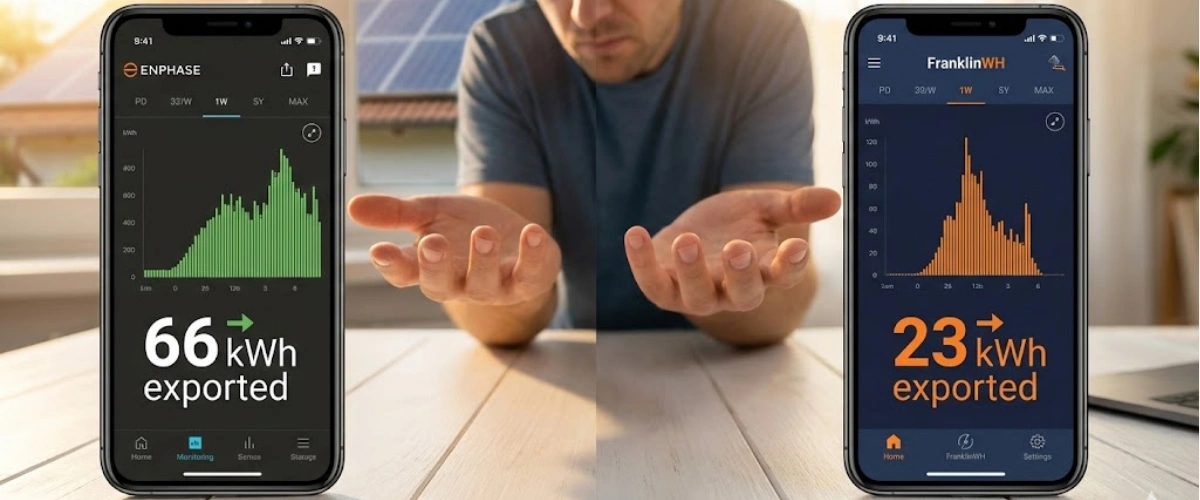
You installed solar panels with a battery system. Everything seems to be working. But when you check your monitoring apps, something doesn't add up.
Your Enphase app shows you exported 66 kWh to the grid yesterday. Your battery app says only 23 kWh. That's a massive difference. Which one is telling the truth? And more importantly, are you losing money because of bad data?
This isn't just a numbers game. When your monitoring apps show different export values, it means something is misconfigured in your system. And misconfiguration often means lost savings, improper battery charging, and confusion when your utility bill arrives.
Let's break down why this happens, which app you should trust, and how to make sure your system is set up correctly from day one.
The Most Common Reason: Your System Architecture
Here's what most solar companies won't tell you upfront: not all of your solar production might be flowing through your battery system.
Solar batteries have input limitations. For example, the FranklinWH aPower system (without an expansion box) can only handle 64 amps of solar input on an 80-amp breaker. But if you have 45 solar panels with Enphase IQ8HC microinverters, you're generating about 72 amps (45 panels × 1.65 amps each).
That extra 8 amps has to go somewhere. In many installations, part of your solar array is grid-tied, meaning it bypasses the battery entirely and exports directly to the utility. Your Enphase app sees all 45 panels producing energy. Your FranklinWH app only sees what's routing through the battery system.
This is the single most common cause of monitoring discrepancies between inverter apps (like Enphase) and battery management apps (like FranklinWH, Tesla, or others).
Why This Happens During Installation
Most homeowners don't realize their system has this split architecture until they start comparing app data months after installation. The installer may not have clearly explained the limitation, or they configured the system to work within electrical code requirements without fully documenting how production would be divided.
In some cases, installers don't add the FranklinWH APBox accessory, which would allow the battery to "see" all solar production for better energy management—even if not all power physically routes through it.
Other Causes: Metering Configuration Problems
Even if your entire solar array routes through your battery, monitoring discrepancies can still occur due to metering setup errors.
CT Clamp Installation Issues
Current Transformer (CT) clamps measure the electricity flowing through wires. Solar monitoring systems use these to track production, consumption, and grid export. If a CT clamp is installed backwards or on the wrong wire, it will report incorrect data—or even inverted data.
For example, a backwards CT clamp might show your home "exporting" energy when you're actually importing it, causing your monitoring platform to calculate wildly inaccurate consumption figures.
This is especially common with SolarEdge and Enphase systems that include consumption monitoring. One reversed clamp can make your app show you're using 8 kW when you're really using 2 kW.
Missing Circuits in Monitoring Setup
Some installations have solar production on multiple electrical circuits, but the monitoring system only tracks one circuit. This is more common in homes with main panel upgrades, subpanels, or older electrical systems that were retrofitted for solar.
If your monitoring platform isn't configured to capture all circuits, it will underreport production and export values.
Software Configuration Errors
Modern solar systems require careful software setup. Installers must configure:
- Which devices are connected (inverters, batteries, meters)
- How energy flows through the system
- What the CT clamps are measuring (production vs. consumption vs. grid connection)
If these settings are wrong in the monitoring platform, the displayed data will be wrong—even if the hardware is perfectly installed. Understanding everything you need to know about solar and battery storage helps you recognize when software configuration is the culprit.
Why Battery Monitoring Matters Under NEM 3.0
California's NEM 3.0 policy changed the solar game. Export rates dropped by 75% compared to NEM 2.0, making battery storage essential for maximizing savings.
Under NEM 3.0, the time of day you export energy matters more than ever. Peak export rates (4-9 PM) pay significantly more than off-peak rates. This means your battery needs to charge during low-value hours and discharge during high-value hours.
But if your monitoring isn't accurate, your battery can't optimize properly. You might be exporting at the wrong times, undercharging your battery, or missing peak-rate opportunities entirely.
Accurate monitoring ensures your battery operates in the right mode (self-consumption vs. time-of-use optimization) and charges/discharges at the most profitable times. This is how solar batteries can maximize your savings under California's new billing structure.
How to Verify Your System is Working Correctly
If your solar monitoring apps are showing different numbers, here's how to diagnose the problem:
Check Your Utility Bill First
Your utility meter is the most reliable source of truth. It's what determines your actual bill, and utilities are legally required to maintain accurate metering.
Compare your utility bill's import and export data to both your Enphase app and battery app over the same time period. Whichever app more closely matches your utility data is likely configured correctly.
If neither app matches your utility bill, you have a configuration problem that needs professional attention.
Review Your System Documentation
Your installer should have provided documentation showing:
- How many solar panels are connected to which inverters
- Whether your battery system captures all solar production or just a portion
- CT clamp placement locations
- Expected production ranges
If this documentation is missing or incomplete, that's a red flag about proper installation quality.
Use Live Monitoring Features
Both Enphase and most battery apps offer real-time monitoring. Turn on a major appliance (like your HVAC or electric dryer) and watch what happens in both apps.
If one app shows a consumption spike and the other doesn't, you know which system is properly monitoring your home's energy use. This can help you identify which monitoring platform is configured correctly and boost solar savings with smart monitoring.
Contact the Original Installer
Start with the company that installed your system. They should be able to remote-access your monitoring platforms and verify the configuration. If CT clamps are backwards or circuits are missing from the monitoring setup, they can often fix this remotely.
However, if your installer is unresponsive or out of business (unfortunately common in the solar industry), you'll need to work with a qualified solar service company that can diagnose and fix monitoring issues.
The Real Culprit: Installation and Configuration Errors
Most monitoring discrepancies trace back to installation shortcuts or inexperience with complex battery systems.
Common mistakes include:
- Not accounting for battery input limitations during system design
- Installing CT clamps without verifying correct polarity
- Failing to configure monitoring software for the actual system architecture
- Not explaining to homeowners why their apps might show different values
These aren't inevitable problems. They're preventable with proper planning, quality installation practices, and clear communication. Avoiding these top solar installation mistakes Los Angeles homeowners make requires working with experienced professionals.
The solar industry has a quality control problem. Many companies hire subcontractors who rush through installations to maximize volume. They don't take time to properly configure monitoring, test system performance, or educate homeowners about their new equipment.
This is why homeowner satisfaction scores vary wildly between solar companies—even when they're installing similar equipment.
Why US Power's Approach Prevents These Issues
US Power takes a different approach to solar installation in Southern California.
CSLB-Licensed Consultants
Every US Power project is managed by CSLB-licensed solar consultants who understand system design, electrical code, and proper equipment integration. They know how to size battery systems correctly, route solar production efficiently, and configure monitoring platforms accurately.
This isn't just about certifications—it's about experience. Our team has seen every type of installation challenge and knows how to prevent problems before they happen. This expertise is why knowing how to choose a solar company in Los Angeles matters so much.
Factory-Direct QCells Partnership
As the exclusive QCells partner in Southern California, US Power controls the entire installation process. We're not a referral service that hands your project to unknown subcontractors.
Our in-house installation teams follow standardized procedures for every project, including thorough monitoring setup and testing before system activation. You get consistent quality, not a roll of the dice.
25-Year Comprehensive Warranty
US Power's 25-year warranty covers panels, workmanship, and performance. If monitoring issues emerge due to installation errors, we fix them—no questions asked, no hidden fees.
Many solar companies only warranty equipment (not labor) or rely on manufacturer warranties that don't cover installation mistakes. Our comprehensive coverage protects your entire investment.
Post-Installation Support
After your system goes live, US Power provides ongoing monitoring support. If you notice discrepancies between apps or unusual performance, our team can remote-access your system, diagnose issues, and schedule service visits if needed.
This matters because monitoring problems often don't appear immediately. They emerge over weeks or months as you learn to read your apps and compare them to utility bills.
Choosing the Right Battery System for Your Solar
If you're planning a solar-plus-battery installation, understanding monitoring compatibility matters from day one.
Match Battery Capacity to Solar Production
Don't just buy the biggest battery. Calculate your actual energy needs and ensure your battery system can handle your solar array's full production capacity.
If you're installing 15 kW of solar panels but your battery can only accept 10 kW input, you'll have the same monitoring discrepancy problem described earlier—because part of your solar production will bypass the battery.
Consider System Integration
Some battery brands integrate better with certain inverter types. Enphase batteries work seamlessly with Enphase microinverters because they're designed as a complete ecosystem. Tesla Powerwall 3 includes a built-in inverter for simplified integration.
FranklinWH, Generac, and other brands use AC coupling, which offers more flexibility but requires careful configuration to ensure accurate monitoring. Understanding which backup power option is right for you helps you choose a system that integrates smoothly with your solar array.
Don't Skip the Extras
Features like the FranklinWH APBox or additional CT clamps aren't just nice-to-haves. They're often essential for accurate monitoring and optimal system performance.
Cutting corners during installation to save a few hundred dollars can cost you thousands in lost savings and troubleshooting headaches over the system's lifetime. Understanding why batteries are worth it for solar in California means investing in proper installation from day one.
What to Do If You Already Have Monitoring Issues
Already dealing with app discrepancies? Here's your action plan:
- Document the discrepancy - Screenshot both apps showing the same time period with different values
- Compare to utility bill - Check which app more closely matches your utility meter data
- Contact your installer - Request a system configuration review and correction
- Get a second opinion - If your installer is unresponsive, consult another qualified solar company
- Consider system upgrades - Missing components (like APBox) might need to be added
Don't ignore monitoring problems. They usually indicate underlying configuration issues that can affect your system's performance and savings.
Making Sure Your Solar Installation Goes Right
The best way to avoid monitoring headaches is to prevent them during installation.
Ask these questions before signing with any solar company:
- Are your installers CSLB-licensed or subcontracted?
- How will you configure monitoring for my specific system architecture?
- What happens if my battery can't handle all my solar production?
- Do I need additional equipment (like APBox) for accurate monitoring?
- What post-installation support do you provide for monitoring issues?
Companies with quality installation practices will have clear, detailed answers. Vague responses or dismissive attitudes are warning signs. Learning about things you must know before going solar in California helps you ask the right questions upfront.
Your solar system is a 25-year investment. Taking time to verify proper monitoring setup during installation prevents years of confusion and ensures you maximize your savings from day one.
Frequently Asked Questions
Which solar monitoring app should I trust most?
Can monitoring errors affect my utility bill?
How often should I check my solar monitoring apps?
Do all solar battery systems have monitoring issues?
Can I fix monitoring configuration myself?



Why Professional Solar Installation Matters: Safety Lessons from DIY Mistakes
Six dangerous mistakes. Thousands of dollars at risk. US Power can help you.
Choosing Between AC vs DC Solar Batteries for Energy Savings
Explore AC vs. DC solar systems and maximize your home’s backup and savings.

Solar Panel Warranties for Southern California Homes
Understand why homeowners should know about solar panel warranties in SoCal.








Derechos de autor © 2025 US POWER | Energía solar y techosUS Power - Axia by QCells. All Rights Reserved.

¡Obtenga una estimación solar instantánea usando el satélite!