



Bought a House with Solar? Here's How to Pick the Right PG&E Rate Plan
Confused about E-TOU-C, E-TOU-D, or E-ELEC? New homeowners with solar often don't know which PG&E rate plan saves them the most.
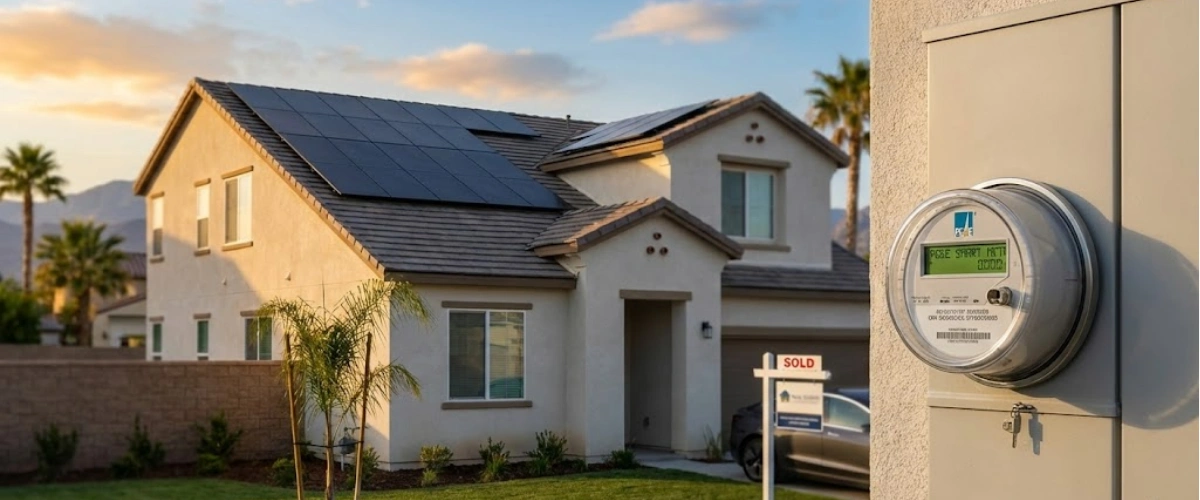
You just closed on your California home. The solar panels on the roof were a selling point—lower electric bills, right? Then you get the first PG&E notice asking you to pick between E-TOU-C, E-TOU-D, and E-ELEC, and suddenly you're drowning in rate schedules, time-of-use windows, and baseline allowances.
Here's what most new homeowners don't realize: the rate plan you choose can swing your annual electric costs by $500 to $1,200. And if you don't understand which Net Energy Metering (NEM) version your system is on, you might be leaving serious money on the table.
This guide breaks down exactly how to pick the right PG&E rate plan based on your solar system, your household usage, and—most importantly—which NEM version you inherited when you bought the house.
The NEM Confusion: Does It Transfer When You Buy a House?
Let's clear up the biggest misconception right now: NEM status stays with the house, not the previous owner.
If the solar system was installed under NEM 1.0 or NEM 2.0, you—as the new homeowner—inherit that same NEM agreement. You don't automatically get bumped to NEM 3.0 just because you're a new owner.
Why This Matters More Than You Think
NEM 2.0 customers get paid significantly more for excess solar energy sent back to the grid. NEM 3.0 customers? They're stuck with export rates that are 75% lower during most hours of the day.
Here's the breakdown:
- NEM 1.0/2.0: Full retail rate credit for exported solar (around $0.30-0.45/kWh depending on rate plan)
- NEM 3.0: Export value drops to $0.05-0.10/kWh during most daytime hours
This is why confirming your NEM status is the first thing you need to do before picking a rate plan.
How to Confirm Your NEM Status
Call PG&E's dedicated solar customer line: 1-877-743-4112. Have your account number ready and ask: "Which Net Energy Metering program is my address enrolled in?"
They'll confirm whether you're on NEM 1.0, NEM 2.0, or NEM 3.0. Write this down. It determines everything that follows.
If you want to dive deeper into how NEM 2.0 grandfathered with the house works, this comprehensive guide explains the technical details and legal framework.
E-TOU-C vs. E-TOU-D vs. E-ELEC: Breaking Down Your Options
Once you know your NEM version, here's how to pick between PG&E's three main solar rate plans. For a broader perspective on understanding which rate plan works best across different California utilities, this comparative analysis can help frame your decision.
E-TOU-C (Time-of-Use Option C)
Peak hours: 4 PM - 9 PM every day
Best for: Moderate-usage households who can shift most electricity use outside of 4-9 PM
Key features:
- Lower baseline allowance (meaning you hit higher tier pricing faster)
- Narrower peak window compared to E-TOU-D
- Works well if you have a small to medium-sized solar system
Who should choose this: If your solar system covers most of your daytime usage and you don't run major appliances during the 4-9 PM window, E-TOU-C often delivers the lowest bills.
E-TOU-D (Time-of-Use Option D)
Peak hours: 5 PM - 8 PM on weekdays only
Best for: High-usage households or those with less predictable schedules
Key features:
- Higher baseline allowance before tier pricing kicks in
- Peak hours only apply Monday-Friday
- Better for families who need flexibility on weekends
Who should choose this: If you consistently exceed baseline usage (common with larger homes, pools, or EVs), E-TOU-D's higher allowance often saves you money even with higher base rates.
E-ELEC (Electric Home)
Peak hours: 4 PM - 9 PM every day
Best for: NEM 3.0 customers ONLY (you have no other choice)
Key features:
- Required for all NEM 3.0 solar customers
- Significantly higher time-of-use differentials
- Designed to encourage battery storage adoption
Who should choose this: If PG&E confirms you're on NEM 3.0, this is your only option. No debate needed.
NEM 2 vs. NEM 3: Why Your Version Determines Everything
Your NEM version doesn't just affect export credits—it fundamentally changes your entire rate plan strategy. Understanding California's NEM 3.0 billing changes is crucial for making informed decisions about your energy future.
If You're on NEM 2.0
Your advantage: Full retail-rate credits for excess solar production
Best rate plan approach: Focus on minimizing your total kWh usage during peak hours. E-TOU-C usually wins because the narrower peak window and lower baseline work in your favor when your solar is covering most daytime usage.
Do you need batteries? Probably not from a financial perspective. Your export credits are so valuable that adding $15,000-20,000 in battery storage rarely pays back within 10 years.
If You're on NEM 3.0
Your challenge: Export credits are 75% lower than NEM 2.0
Best rate plan approach: You're locked into E-ELEC. No choice here.
Do you need batteries? Almost certainly yes. Without batteries, you'll export most of your solar production during the day at terrible rates ($0.05-0.10/kWh), then buy power back at night for $0.40-0.50/kWh. Batteries let you store that daytime solar and use it during expensive evening hours.
What New Homeowners Need to Know About Inherited Solar Systems
Buying a house with existing solar is different from installing a new system. Here are the critical questions you need to answer in your first 30 days of ownership.
Is the Solar System Owned or Leased?
If the previous owner had a solar lease or PPA (Power Purchase Agreement), you inherited that contract. This changes everything:
- You're locked into their monthly payments
- You can't change the system without the leasing company's approval
- You may not be able to switch rate plans without permission
If the system is owned outright, you have full control over rate plan selection and future upgrades.
What Size Is Your Solar System?
Check your inverter specs or look at the original installation documents. A 5 kW system produces very different amounts than a 10 kW system, which directly impacts which rate plan saves you the most money.
Quick math: In Southern California, a 1 kW system produces roughly 1,400-1,600 kWh per year. Multiply your system size by 1,500 to estimate your annual production.
Does Your System Have Battery Storage?
If batteries are already installed, you might already be optimized for time-of-use arbitrage. This usually means E-TOU-C or E-TOU-D (if you're on NEM 2.0) will deliver the best savings since you can charge batteries during cheap off-peak hours and discharge during expensive peak hours.
Should You Add Battery Storage? It Depends on Your NEM Version
The Reddit thread that inspired this guide had fierce debate about batteries. Here's the truth: battery economics are completely different under NEM 2.0 vs. NEM 3.0.
Battery ROI Under NEM 2.0
Payback period: 12-18 years (sometimes longer)
Reason: Your export credits are already so valuable that storing energy in batteries instead of exporting it to the grid actually costs you money in most scenarios.
Exception: If you experience frequent power outages or want backup power for emergencies, batteries provide peace of mind—but don't expect them to pay for themselves through bill savings alone.
Battery ROI Under NEM 3.0
Payback period: 6-10 years
Reason: Export rates are terrible, but evening electricity costs are $0.40-0.50/kWh. Every kWh you store during the day and use at night saves you real money.
The math: A 13.5 kWh battery cycling once per day can save $1,400-1,800 per year under NEM 3.0 rate structures. At $12,000-15,000 installed cost, that's an 8-10 year payback.
If you're considering adding battery storage to maximize your solar investment, start by calculating your actual savings potential. For existing systems, upgrading your existing system with batteries can make financial sense—especially if you're on NEM 3.0.
Step-by-Step: Confirming Your NEM Status with PG&E
Don't guess. Don't assume. Here's exactly how to verify your NEM status before making any rate plan decisions. For more detailed guidance on how to read your PG&E bill, this comprehensive guide walks through every line item.
Step 1: Gather Your Account Information
You'll need:
- PG&E account number
- Service address
- Recent electric bill (the one that shows your solar production and export credits)
Step 2: Call PG&E Solar Customer Service
Number: 1-877-743-4112
Hours: Monday-Friday, 7 AM - 6 PM
What to say: "I recently purchased this property and need to confirm which Net Energy Metering program my address is enrolled in."
Step 3: Request Written Confirmation
Ask the representative to send you an email or letter confirming your NEM status. You want this in writing for your records.
Step 4: Review Your Rate Plan Options
- If NEM 1.0 or 2.0: You can choose between E-TOU-C, E-TOU-D, or even legacy E-1 (tiered) if you're on NEM 1.0
- If NEM 3.0: You're automatically on E-ELEC with no other options
How US Power Helps New Homeowners Optimize Their Solar
At US Power, we work with dozens of homeowners every month who just bought a house with existing solar. Here's how we help them maximize their investment.
Free System Health Check
We'll inspect your inherited solar system to confirm:
- Panel condition and production efficiency
- Inverter functionality and warranty status
- Whether the system size matches your actual usage needs
- If any upgrades or repairs are needed
Rate Plan Optimization Analysis
Our CSLB-licensed consultants will:
- Review 12 months of your PG&E bills (if available from previous owner)
- Analyze your household usage patterns
- Model out E-TOU-C vs. E-TOU-D scenarios specific to your system
- Recommend the rate plan that saves you the most money
Battery Upgrade Options (If Needed)
If you're on NEM 3.0 or experience frequent outages, we'll provide:
- Transparent battery pricing (15-20% below market through factory-direct QCells partnerships)
- Honest ROI projections based on your actual usage and rate plan
- 25-year comprehensive warranty covering batteries and installation
Why homeowners choose US Power:
- 180+ five-star Google reviews
- American-made QCells panels and batteries
- 3-6 week installation timeline (not 3-6 months)
- No hidden fees or surprise charges
Take Control of Your Solar Investment Before Your First Bill Arrives
You didn't buy a house just to stress about electric bills. The solar panels on your roof are an asset—but only if you're on the right rate plan and NEM program.
Here's what to do this week:
- Call PG&E and confirm your NEM status (1-877-743-4112)
- Review your inherited solar system size and ownership status
- Calculate your estimated annual production vs. usage
- Choose E-TOU-C or E-TOU-D based on your peak usage patterns (or accept E-ELEC if you're on NEM 3.0)
And if you want expert help instead of DIY guesswork? US Power's consultations are completely free—no sales pressure, just honest analysis of your system and rate plan options.
Frequently Asked Questions
Can I change my rate plan after I've chosen one?
What if the previous owner didn't tell me which NEM program the house is on?
Will upgrading to a larger solar system kick me off NEM 2.0?
Do I need to notify PG&E when I buy a house with solar?
Can I add batteries to my NEM 2.0 system without losing my rate plan?



How Much Did Your Solar System Actually Save You?
Calculate your real solar savings and reduce electricity bills through US Power.

Crédito fiscal federal para energía solar: su última opción para ahorrar un 30%
Your last chance to claim the full 30% federal solar tax credit. Claim savings now!

How Rising Electricity Rates Are Slashing Solar Payback Periods
Solar Payback Period CA: Break even on solar 33% faster as SCE rates surge 12.9%.








Derechos de autor © 2025 US POWER | Energía solar y techosUS Power - Axia by QCells. All Rights Reserved.

¡Obtenga una estimación solar instantánea usando el satélite!