




Tesla Powerwall 3: Backup Switch vs Gateway 3 Explained

Most Tesla installers recommend expensive Gateway 3 setups when a simpler Backup Switch would work better. Why installers overcomplicate Powerwall 3 designs?
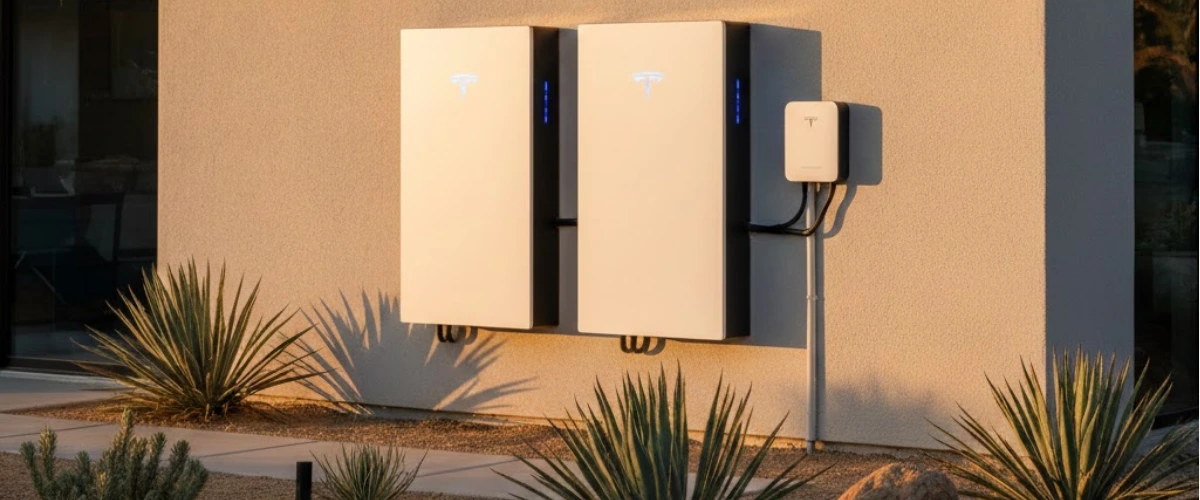
You're excited about going solar with Tesla Powerwall 3 batteries. Your installer sends over the design—and suddenly you're looking at a Tesla Gateway 3, a new 125-amp subpanel, and a price tag that makes you wonder if something's off.
You're not imagining it. For most Southern California homes with standard 200-amp service, that complex Gateway 3 setup is completely unnecessary. There's a simpler, cheaper, and cleaner solution called the Tesla Backup Switch—and many installers won't mention it because it cuts into their profit margins.
Let's break down exactly what you need to know so you don't overpay for an overcomplicated installation.
Why Battery Storage Matters with NEM 3.0
Before diving into backup configurations, understand why Tesla Powerwall 3 installations exploded in California after April 2023. That's when NEM 3.0 went into effect, slashing solar export credits by about 75%.
Under the old NEM 2.0 rules, your excess solar energy sent to the grid earned nearly retail rate credits. Now? You get pennies on the dollar. This makes solar batteries essential for maximizing your savings—you need to store that solar energy instead of giving it away.
The Powerwall 3 solves this problem beautifully with 13.5 kWh of usable storage. But here's where installers start making designs more complicated (and expensive) than they need to be.
Backup Switch vs Gateway 3: Understanding Your Options
Tesla offers two ways to configure whole-home backup with Powerwall 3. The difference comes down to how the system disconnects from the grid during an outage.
Tesla Backup Switch (The Simpler Solution)
The Backup Switch is an automatic transfer switch installed between your utility meter and main electrical panel. When it detects a grid outage, it physically disconnects your home from the utility lines and lets your Powerwall 3 power everything.
Key advantages:
- Works directly with your existing 200-amp main panel
- No need for a separate subpanel or load center
- Cleaner installation with less hardware
- Typically saves $3,000-$5,000 in equipment and labor costs
- Utility-approved in SCE and most California territories
Tesla Gateway 3 (The Complex Alternative)
The Gateway 3 is Tesla's older backup solution that acts as both an energy gateway and disconnect device. When paired with a new 125-amp backup load center, all your existing breakers get moved to this new subpanel.
When it makes sense:
- Homes with service panels over 200 amps (like 400-amp service)
- Main panels incompatible with Backup Switch (certain Cutler-Hammer or Eaton models)
- Specific utility requirements where Backup Switch isn't approved
For a standard 200-amp home? It's overkill—and installers know it.
Want to understand which backup power option is right for you beyond just Tesla products? The decision tree extends to generators, solar-only systems, and hybrid approaches.
What Most Installers Won't Tell You About Gateway 3 Designs
Here's the uncomfortable truth: Gateway 3 installations are significantly more profitable for installers.
Installing a Gateway 3 with a new 125-amp subpanel means:
- More equipment to mark up (Gateway 3 costs more than Backup Switch)
- Additional subpanel hardware and breakers to sell
- More labor hours (moving all breakers, running new conduit)
- Longer project timelines
When your sales rep says "your panel is full" or suggests Gateway 3 without explaining alternatives, ask specifically why Backup Switch won't work. In most cases, breakers can be consolidated using tandem breakers, or a small auxiliary subpanel can be added for far less than a full Gateway 3 installation.
One California homeowner recently posted on Reddit about this exact scenario. Despite having a standard 200-amp panel with room for breaker consolidation, their installer pushed a Gateway 3 setup. After questioning it, solar experts on the thread unanimously recommended the Backup Switch approach—saving the homeowner thousands.
Understanding everything you need to know about solar and battery storage helps you spot these oversized designs before signing contracts.
How Tesla Powerwall 3 Works with Your Solar System
Regardless of whether you choose Backup Switch or Gateway 3, the Powerwall 3 integration with your solar panels works the same way.
Your QCells solar panels (or other brand) produce DC electricity during the day. That power flows through your solar inverter, converting it to AC electricity your home uses. Excess production charges your Powerwall 3 batteries. When the batteries are full, remaining excess can export to the grid—though under NEM 3.0, you want to minimize that.
The Backup Switch Configuration
With Backup Switch, your system looks like this:
- Utility meter connects to Tesla Backup Switch
- Backup Switch connects to your existing main panel
- Solar and Powerwall 3 connect to main panel via dedicated breakers
- During outage: Backup Switch disconnects from utility, Powerwall powers entire panel
The Gateway 3 Configuration
With Gateway 3, things get more complicated:
- Utility meter connects to your existing main panel (which stays mostly empty)
- Gateway 3 sits between main panel and new 125A backup load center
- All your home's breakers move to the backup load center
- Solar and Powerwall 3 connect through Gateway 3
- During outage: Gateway 3 isolates the backup load center from utility
Same backup result, but with significantly more hardware and complexity. For the technically curious, Choosing the Right Backup for Southern California Homes dives deeper into regional considerations for backup power systems.
The True Cost Difference: Backup Switch vs Gateway 3 Installation
Let's talk numbers. Based on typical Southern California installations in 2025:
Backup Switch Installation:
- Tesla Backup Switch unit: $1,000-$1,500
- Installation labor: 4-6 hours
- Additional materials: Minimal
- Total added cost: $2,500-$3,500
Gateway 3 Installation:
- Tesla Gateway 3 unit: $2,000-$2,500
- New 125A load center and breakers: $800-$1,200
- Installation labor: 10-14 hours (moving all breakers)
- Additional conduit and materials: $500-$800
- Total added cost: $6,000-$8,500
That's a $3,500-$5,000 difference for identical whole-home backup functionality. For context, that's nearly half the cost of a second Powerwall 3 battery.
Wondering are batteries worth it for solar in California at all? The ROI calculation depends heavily on avoiding these inflated installation costs.
Red Flags: When Your Installer's Design Doesn't Make Sense
Watch for these warning signs that your installer is overcomplicating your Powerwall 3 design:
Red Flag #1: No explanation of alternatives
Any reputable installer should explain both Backup Switch and Gateway 3 options, detailing which is appropriate for your specific electrical setup.
Red Flag #2: "Your panel is full"
Full panels can almost always accommodate solar and battery with breaker consolidation. If your installer hasn't offered to consolidate breakers using tandems, they're not trying very hard.
Red Flag #3: Gateway 3 for standard 200A service
Unless you have a genuinely incompatible panel brand or specific utility restrictions, Gateway 3 makes no sense for typical 200-amp residential service.
Red Flag #4: Pressure to sign quickly
"This design is ready to go, just need your signature today" usually means they don't want you asking questions or getting second opinions.
Red Flag #5: Vague cost breakdowns
Equipment and labor should be clearly itemized. If everything's bundled into one opaque price, you can't identify what's actually necessary versus profitable add-ons.
Need help evaluating your installer's credibility? Our guide on How to Choose a Solar Company in Los Angeles covers the essential vetting questions every homeowner should ask.
One Powerwall 3 or Two? The Expansion Pack Question
Here's another design decision where installers sometimes prioritize profit over practicality: recommending two full Powerwall 3 units when one Powerwall 3 plus an expansion pack makes more sense.
Two full Powerwall 3 units means:
- Two dedicated breakers in your electrical panel
- Two separate battery installations
- Higher equipment cost
One Powerwall 3 plus expansion pack means:
- Single breaker connection
- Integrated installation
- Typically $2,000-$3,000 less expensive
- Same 27 kWh total capacity
For most homes, one Powerwall 3 with expansion provides identical performance at lower cost. If your installer is quoting two full units without explaining this alternative, ask why. The only legitimate reasons are specific load requirements or panel space optimization—and they should be able to clearly articulate those reasons.
How US Power Designs Tesla Powerwall 3 Installations the Right Way
At US Power, we start every Powerwall 3 design with a simple question: What's the minimum hardware needed to give this homeowner reliable whole-home backup?
For Southern California homes with standard 200-amp panels, that's almost always the Backup Switch configuration. Our CSLB-licensed electricians evaluate your specific panel, identify any breaker consolidation needs, and design the cleanest installation possible.
Our typical Powerwall 3 installation includes:
- Site evaluation of existing electrical panel
- Breaker consolidation if needed (no extra charge)
- Tesla Backup Switch installation
- One or two Powerwall 3 units based on actual energy needs
- Integration with your QCells solar array
- Complete permitting and utility coordination
- 3-6 week timeline from contract to Permission to Operate
We're transparent about the rare cases where Gateway 3 makes sense—and we'll tell you exactly why. But we won't upcharge you for unnecessary complexity just because we can.
Before making any solar decision, review things you must know before going solar in California to ensure you're not missing critical considerations beyond just equipment choices.
Making the Right Powerwall 3 Decision
If you're considering Tesla Powerwall 3 for your Southern California home, here's your action plan:
Step 1: Get multiple quotes and specifically ask each installer about Backup Switch vs Gateway 3 for your home. Any installer who can't clearly explain both options should be eliminated.
Step 2: Request itemized pricing that separates equipment, labor, and permitting costs. Bundled "all-in" pricing makes it impossible to identify where you're being overcharged.
Step 3: Verify your installer is CSLB-licensed (California Contractors State License Board). This isn't optional—unlicensed solar work is illegal and voids your homeowner's insurance.
Step 4: Check utility approval status. Make sure your installer confirms Backup Switch is approved for your specific utility provider before assuming it's available.
Step 5: Lock in the 30% federal tax credit before December 31, 2025. This applies to both your solar panels and Powerwall 3 batteries, but it expires completely at year-end. That's 30% of your entire system cost—potentially $10,000-$15,000 in savings.
The federal solar tax credits updated 2025 deadline isn't getting extended. Don't leave money on the table because your installer dragged out the design process.
Look for Trusted Solar Partners
The difference between Tesla Backup Switch and Gateway 3 comes down to complexity and cost—not performance. For most Southern California homes with standard 200-amp service, the Backup Switch delivers identical whole-home backup at 40-50% lower installation cost.
Installers who push Gateway 3 designs without clear justification are prioritizing their profit over your wallet. Don't accept "that's just how we do it" as an answer.
At US Power, we design every Powerwall 3 installation around your actual needs. Our factory-direct QCells partnership means we don't inflate equipment costs to hit margin targets. You get honest recommendations, clean installations, and 25-year warranties that actually mean something.
The 30% federal tax credit expires in less than two weeks. That's $9,000-$12,000 in savings for a typical solar + Powerwall 3 system—money you'll never get back if you miss the deadline.
Get your free consultation today and see what a properly designed Powerwall 3 installation actually costs.
Frequently Asked Questions
Can I upgrade from Gateway 3 to Backup Switch later?
Will the Backup Switch work with my existing solar system?
How long does whole-home backup last with Powerwall 3?
Does SCE approve both Backup Switch and Gateway 3?
What if my electrical panel really is incompatible with Backup Switch?


Is Clean Energy Really Profitable? Debunking the Wealth Myth
Discover the truth about profits and savings in the booming clean energy market.

How to Choose a Solar Installer in California (And Avoid Costly Mistakes)
One wrong choice in solar installation can cost you $3,000+ and months of headaches.

Solar Installation Timeline Explained for California Homeowners
Understand the steps and timing for a smooth home solar installation process.








Copyright © 2025 US Power - Axia by QCells. All Rights Reserved.

Get an instant solar estimate using satellite!