




How to Stop Your Solar Battery from Draining During an Outage

Your solar battery shouldn't drain completely during a power outage. Discover the reserve settings that protect your battery charge so panels can recharge when the sun rises.
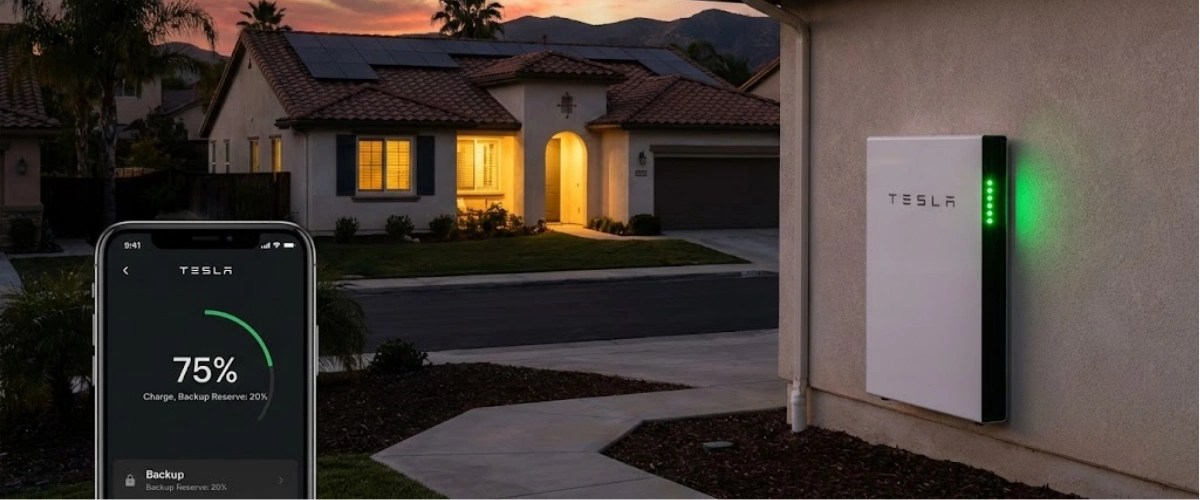
You went solar to avoid blackouts. You invested in battery backup for peace of mind. But when the power went out last night, your battery drained to 0%—and this morning, your solar panels can't restart because there's no reserve power left.
This is one of the most frustrating scenarios Southern California homeowners face with their solar battery systems. The good news? It's completely preventable with the right reserve settings.
In this guide, you'll learn exactly how to configure your battery to preserve enough charge for next-day solar restart, why batteries drain differently during vs. before outages, and the specific app settings that protect your backup power investment.
Why Your Solar Battery Drains to 0% During Outages
Here's what most homeowners don't realize: your battery has two different operating modes with completely different discharge behaviors.
Normal Grid-Connected Operation
When the grid is up, your battery management system (BMS) automatically preserves a reserve—typically 20% state of charge (SOC). This means if you have a 13.6 kWh battery, the system stops discharging at around 2.7 kWh remaining.
Why? To ensure you have backup power available the instant the grid fails.
This 20% reserve is factory-set in most systems like Tesla Powerwall, Franklin aPower, Enphase IQ, and QCells Q.HOME batteries. It's your safety net.
During an Actual Outage
But here's the problem: when the grid goes down and your system switches to backup mode, that 20% reserve becomes available for use. Your battery will now discharge down to its true minimum—often 5-10% SOC or even lower.
For the Reddit user with a SolarEdge inverter and Franklin battery, this is exactly what happened. The battery was protecting 20% during normal operation, but once the outage hit, the system said "emergency mode activated" and made that reserve available to power the home.
The battery kept the lights on through the night. But by morning, it was at 0%. No reserve power meant the solar panels couldn't restart the system—they need a small amount of battery power to "bootstrap" the inverter and begin charging.
The Core Issue: Reserve Settings vs. Discharge Limits
Most battery apps let you set a backup reserve for grid-connected mode. But they don't always have a separate setting for outage discharge limits. This creates a gap where your battery can drain completely during extended outages, leaving you without the 5-10% needed for solar restart the next morning.
Understanding these operating modes is critical because they directly affect how solar batteries maximize savings under NEM 3.0 while maintaining backup protection.
Understanding Battery Reserve Settings: What You Can Control
Let's break down the settings you actually have control over in popular battery systems used in Southern California.
Franklin aPower Battery (FranklinWH App)
The Franklin system gives you direct control over backup reserve through the app:
Step 1: Open FranklinWH app → Settings → Mode
Step 2: Select "Self-Consumption" mode
Step 3: Adjust the SOC slider at the top (this sets your backup reserve)
Key insight: If you set reserve to 100%, the battery charges fully from solar but won't discharge at all during normal operation—it's pure backup mode. This eliminates daily cycling benefits but ensures maximum backup duration.
The challenge? During an actual grid outage, the Franklin system will still discharge below your set reserve to keep critical loads running. There's no separate "stop at X% during outage" setting in the standard app.
Tesla Powerwall (Tesla App)
Tesla gives you three operating modes:
- Self-Powered: Maximizes solar usage, 20% default reserve
- Time-Based Control: Optimizes for TOU rates, adjustable reserve
- Backup-Only: 100% reserve, no daily cycling
You can adjust backup reserve from 0-100% in the app. However, like Franklin, during an outage the Powerwall will discharge below your normal reserve setting to keep loads powered.
SolarEdge Energy Hub + Battery
SolarEdge systems have backup reserve settings in the monitoring portal, but specific discharge behavior during outages varies by battery manufacturer (LG, BYD, etc.). The inverter manages the discharge curve.
Enphase IQ Battery
Enphase allows reserve adjustment from 0-30% in normal mode. During outages, the system manages discharge to preserve a small restart reserve automatically—typically 5%.
For a comprehensive understanding of how different battery chemistries and configurations work, see our guide on everything you need to know about solar and battery storage.
How to Configure Your Battery Reserve Before an Outage
The solution isn't just setting a reserve—it's proactively managing your battery before severe weather hits. Here's the exact strategy Southern California homeowners should follow.
Strategy 1: Pre-Storm Reserve Boost (Recommended)
When weather forecasts predict high winds, red flag warnings, or PSPS events:
24-48 hours before: Manually increase your reserve to 70-80%
Rationale: This leaves your battery mostly full when the outage hits
How long it lasts: A 13.6 kWh battery at 80% reserve (10.9 kWh) can power essential loads for 24-36 hours
Real example: If you normally keep 20% reserve (2.7 kWh available), but boost to 80% pre-storm, you start the outage with 11 kWh instead of 2.7 kWh. That's 4x more backup time.
Strategy 2: Load Management During Outages
Even with optimal reserve settings, you need to manage consumption during the outage itself:
Turn off non-essentials immediately:
- Pool pumps
- Second refrigerators
- EV charging
- Electric water heater (if possible)
- Air conditioning (if tolerable)
Prioritize critical loads:
- Primary refrigerator
- Internet/communications
- Medical equipment
- Lighting (minimal)
- Well pump (if applicable)
Time heavy loads to solar production: If the outage extends into a second day and your panels restart, run dishwasher, laundry, and cooking appliances between 10 AM - 3 PM when solar is peak.
Strategy 3: Smart Panel Integration
Systems like Span Panel or Lumin automatically shed non-essential circuits when battery SOC drops below configured thresholds. For example:
- At 50% SOC: Disconnect pool equipment, outdoor lighting
- At 30% SOC: Disconnect second HVAC zone, garage circuits
- At 15% SOC: Keep only refrigerator, lights, and critical medical loads
This automatic load shedding prevents the battery from draining completely and preserves restart capacity. To calculate how long a solar battery can power your house with different load profiles, use actual consumption data from your utility bills.
Real-World Scenarios: When Reserve Settings Matter Most
Let's look at how reserve configuration plays out in actual Southern California grid events.
Scenario 1: SCE PSPS Event (2-3 Days)
The situation: Red flag warning triggers Public Safety Power Shutoff in foothill communities. Grid expected to be down 48-72 hours.
Without proper reserve:
- Day 1: Battery drains from 20% reserve (2.7 kWh) overnight → hits 0% by morning
- Day 2: Solar can't restart, no power for 2 more days
- Total backup time: 8-12 hours
With 70% pre-storm reserve:
- Day 1: Battery drains from 70% (9.5 kWh) with load management → hits 20% by morning
- Day 2: Solar restarts at sunrise, recharges battery to 60% by 2 PM, powers home evening
- Day 3: Repeat cycle until grid returns
- Total backup time: Full 48-72 hours with solar recharge
Scenario 2: Wildfire Smoke + Grid Strain
The situation: Heavy smoke reduces solar production to 30% while simultaneous heat wave strains grid. Rolling blackouts.
The problem: Even with reserve settings, reduced solar output means batteries charge slowly during the day. If you discharge heavily overnight, you enter the next outage with less capacity.
The solution: During smoke/heat events, increase reserve to 50% minimum and reduce AC usage during outage periods. This ensures battery can fully recharge on low-production days. Learn more about how solar and battery systems protect CA homes during grid failures.
Scenario 3: Earthquake + Extended Outage
The situation: Major seismic event damages grid infrastructure. Power out 5-7 days in some areas.
Critical insight: Multi-day outages require a combination approach:
- 70-80% starting reserve
- Aggressive load shedding (refrigerator only in cycles)
- Generator integration (if available)
- Community resource sharing
Without proper reserve management, even large battery systems (20+ kWh) won't last a week. But with disciplined load management and solar recharge, a 13.6 kWh battery can sustain critical loads for extended periods.
What US Power Does Differently: Pre-Configured for SoCal Conditions
When you install a solar + battery system through US Power, you're not just getting equipment—you're getting a system optimized for Southern California's unique grid challenges.
CSLB-Licensed Configuration Expertise
Our consultants configure your battery settings based on:
- Your local utility's outage history (SCE vs PGE)
- Neighborhood-specific PSPS risk levels
- Your home's critical vs. non-critical loads
- Your solar system size relative to battery capacity
Factory-Direct QCells Battery Systems
As the exclusive QCells partner in Southern California, US Power installs the Q.HOME battery with:
- Hybrid inverter capability (true islanding mode)
- Automatic transfer switch included
- Smartphone app without subscription fees
- 15-20% below typical market pricing
Real savings: Competitors charge $18,000-$22,000 for a 13.6 kWh battery system. US Power's factory-direct pricing: $14,500-$17,000 installed. To determine which backup power option is right for you, consider your home's critical loads, typical outage duration in your area, and budget.
Unlike many installers who offer separate warranties from different manufacturers, US Power provides a unified 25-year warranty covering panels, battery, inverter, and workmanship. One call solves any issue.
3-6 Week Installation Timeline
From consultation to Permission to Operate (PTO), US Power completes installations faster than the industry average of 8-12 weeks. This matters in Southern California where fire season arrives quickly.
Why Battery Storage Is Essential in 2026 Under NEM 3.0
If you're considering solar in Southern California, here's why adding battery storage from day one is critical.
NEM 3.0 Changed the Economics
Under California's NEM 3.0 policy that took effect April 2023, solar-only systems receive dramatically reduced export credits—often 75% less than under NEM 2.0.
The math:
- NEM 2.0: Export solar at $0.30/kWh, import at $0.35/kWh (5¢ spread)
- NEM 3.0: Export solar at $0.08/kWh, import at $0.40/kWh (32¢ spread)
What this means: Without a battery, you export valuable midday solar for pennies, then buy evening power at peak rates. Batteries let you store that midday solar and use it during expensive evening hours.
Backup Power + Bill Savings
Battery storage under NEM 3.0 delivers dual benefits:
- Daily cycling: Store excess solar, discharge during peak evening rates (4-9 PM)
- Outage protection: Full backup capability when grid fails
This is why US Power recommends battery storage with every new solar installation in 2026. The payback is now 6-8 years instead of 12-15 years under the old system. To see the full cost-benefit analysis, read our guide on whether batteries are worth it for solar in California.
Common Mistakes Homeowners Make with Battery Reserve Settings
Even with the best equipment, these configuration errors leave homeowners without backup power when they need it most.
Mistake 1: Never Adjusting the Default 20% Reserve
The problem: Factory default settings assume average conditions. But Southern California's wildfire risk, PSPS events, and heat waves aren't average.
The fix: Seasonally adjust your reserve. Keep 30-40% June-October (fire season), return to 20% November-May.
Mistake 2: Not Testing Backup Mode Before an Emergency
The problem: You don't know if your system switches properly until the power actually goes out—and by then it's too late to fix issues.
The fix: Quarterly backup testing. Flip your main breaker, verify loads transfer, check battery discharge rate, confirm solar restart capability. Document any problems and fix before fire season.
Mistake 3: Oversizing Loads on Battery Backup
The problem: Running AC, pool pump, EV charger, and electric water heater simultaneously drains batteries in 2-3 hours.
The fix: Install a critical loads panel that powers only essentials. Or configure smart panel settings to shed heavy loads automatically.
Mistake 4: Ignoring Low-Solar-Production Days
The problem: Batteries discharge normally overnight, but smoky/cloudy days provide only 30-50% solar recharge. You enter the second night with less capacity.
The fix: Monitor weather patterns. If low production expected, manually increase reserve and reduce loads proactively.
Mistake 5: Not Updating Firmware
The problem: Battery manufacturers release firmware updates that improve discharge algorithms, add features, and fix bugs. But many homeowners never update.
The fix: Check for firmware updates quarterly. Most can be done through the app, but some require installer access.
Protecting Your Backup Power Investment
Battery storage is one of the best investments you can make for energy independence in Southern California. But only if configured correctly.
Here's what to do now:
If you have existing solar + battery:
- Open your battery app and verify your current reserve settings
- Increase reserve to 40% minimum for remainder of winter
- Schedule a backup mode test with your installer
- Document your critical loads and consider a load management upgrade
If you're planning solar + battery:
- Request load analysis to size battery correctly
- Ask installers about critical loads panel configuration
- Verify they include backup mode testing in installation
- Confirm 25-year warranty covers battery, not just panels
If you have solar but no battery:
- Get cost estimates for battery retrofit
- Calculate payback under NEM 3.0 economics
- Consider the value of outage protection (not just bill savings)
- Move quickly if SGIP rebates are still available in your area
The next PSPS event or wildfire could happen tomorrow. Don't wait until you're sitting in the dark to wish you'd configured your system correctly.
Frequently Asked Questions


Find the Perfect Solar Tilt Angle for California Homes Homes
The perfect solar tilt angle can make your California system more efficient.

Why 2025 Is the Best Year for California Families to Go Solar
Take advantage of full solar tax credits and rising energy rates—go solar now.

Why Every California Home Needs Energy Management
Learn how energy management helps homeowners save money and stay efficient.








Copyright © 2025 US Power - Axia by QCells. All Rights Reserved.

Get an instant solar estimate using satellite!